Getting Started with TransportMaps.jl
This guide will help you get started with TransportMaps.jl for constructing and using transport maps.
Basic Concepts
What is a Transport Map?
A transport map
Triangular Maps
TransportMaps.jl focuses on triangular transport maps [3], following the Knothe-Rosenblatt rearrangement [6]. This structure ensures that the map is invertible and the Jacobian determinant is easy to compute. A triangular map in
The inverse map
First Example: A Simple 2D Transport Map
using TransportMaps
using Distributions
using Random
using Plots
using LinearAlgebra
Let's create a simple 2D transport map:
Set random seed for reproducibility
Random.seed!(1234)Create a 2D polynomial map with degree 2
M = PolynomialMap(2, 2, Normal(), Softplus())PolynomialMap:
Dimensions: 2
Total coefficients: 9
Reference density: Distributions.Normal{Float64}(μ=0.0, σ=1.0)
Maximum degree: 2
Basis: LinearizedHermiteBasis
Rectifier: Softplus
Components:
Component 1: 3 basis functions
Component 2: 6 basis functions
Coefficients: min=0.0, max=0.0, mean=0.0The map is initially identity (coefficients are zero)
println("Initial coefficients: ", getcoefficients(M))Initial coefficients: [0.0, 0.0, 0.0, 0.0, 0.0, 0.0, 0.0, 0.0, 0.0]Defining a Target Distribution
For optimization, you need to define your target probability density. Let's start with a simple correlated Gaussian:
function correlated_gaussian(x; ρ=0.8)
    Σ = [1.0 ρ; ρ 1.0]
    return logpdf(MvNormal(zeros(2), Σ), x)
end
Then, we construct the MapTargetDensity object. In the default case, automatic differentiation is used with ForwardDiff.jl AD is implemented with DifferentiationInterface.jl. This allows for the use of other packages supported by the interface, e.g., Mooncake.jl, Zygote.jl or FiniteDiff.jl for finite difference approximations. For more information, we also refer to [9].
Create a MapTargetDensity object for optimization
target_density = MapTargetDensity(correlated_gaussian)MapTargetDensity(backend=ADTypes.AutoForwardDiff())Setting up Quadrature
Choose an appropriate quadrature scheme for map optimization:
Gauss-Hermite quadrature (good for Gaussian-like targets)
quadrature = GaussHermiteWeights(2, 2)  # level l=2, (2^l + 1 = 5 points per dimension), 2D
# alternative options:
# quadrature = MonteCarloWeights(1000, 2)  # 1000 samples, 2D
# quadrature = LatinHypercubeWeights(1000, 2)
# quadrature = SparseSmolyakWeights(3, 2)  # Level 3, 2D
TensorProductWeights:
Number of points: 25
Dimensions: 2
Knots: GaussHermiteKnots()Optimizing the Map
Fit the transport map to your target distribution:
result = optimize!(M, target_density, quadrature) * Status: success
* Candidate solution
Final objective value: 2.837877e+00
* Found with
Algorithm: L-BFGS
* Convergence measures
|x - x'| = 3.58e-07 ≰ 0.0e+00
|x - x'|/|x'| = 4.48e-07 ≰ 0.0e+00
|f(x) - f(x')| = 2.75e-14 ≰ 0.0e+00
|f(x) - f(x')|/|f(x')| = 9.70e-15 ≰ 0.0e+00
|g(x)| = 1.45e-09 ≤ 1.0e-08
* Work counters
Seconds run: 0 (vs limit Inf)
Iterations: 9
f(x) calls: 11
∇f(x) calls: 11
∇f(x)ᵀv calls: 0Generating Samples
Once optimized, use the map to generate samples:
Generate reference samples (standard Gaussian)
n_samples = 1000
reference_samples = randn(n_samples, 2)
1000×2 Matrix{Float64}:
0.970656 -0.563375
-0.979218 -0.321198
0.901861 -1.08085
-0.0328031 0.1828
-0.600792 -1.10277
-1.44518 0.0973357
2.70742 -1.50738
1.52445 0.495961
0.759804 1.65377
-0.881437 -0.902006
⋮
0.736417 0.898635
0.191944 0.0989677
0.764671 -0.723075
0.460548 0.805013
-1.45535 -0.952593
-0.73168 0.66637
-0.463285 -0.0398125
0.511219 0.288282
-1.29112 -3.55823Transform to target distribution
target_samples = evaluate(M, reference_samples)1000×2 Matrix{Float64}:
0.970656 0.4385
-0.979218 -0.976093
0.901861 0.0729767
-0.0328031 0.0834377
-0.600792 -1.1423
-1.44518 -1.09774
2.70742 1.26151
1.52445 1.51713
0.759804 1.60011
-0.881437 -1.24635
⋮
0.736417 1.12831
0.191944 0.212936
0.764671 0.177892
0.460548 0.851446
-1.45535 -1.73584
-0.73168 -0.185522
-0.463285 -0.394516
0.511219 0.581945
-1.29112 -3.16784Visualizing Results
Let's plot both the reference and target samples:
p1 = scatter(reference_samples[:, 1], reference_samples[:, 2],
    alpha=0.6, title="Reference Samples",
    xlabel="Z₁", ylabel="Z₂", legend=false, aspect_ratio=:equal)

p2 = scatter(target_samples[:, 1], target_samples[:, 2],
    alpha=0.6, title="Target Samples",
    xlabel="X₁", ylabel="X₂", legend=false, aspect_ratio=:equal)

plot(p1, p2, layout=(1, 2), size=(800, 400))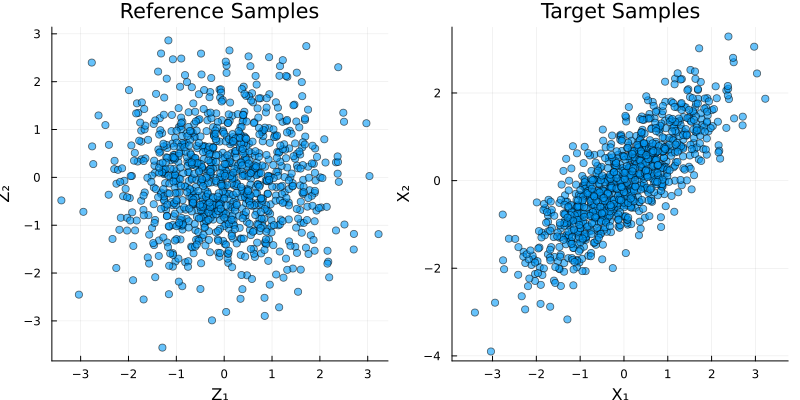
Evaluating Map Quality
Check how well your map approximates the target:
Variance diagnostic (should be close to 1 for good maps)
var_diag = variance_diagnostic(M, target_density, reference_samples)
println("Variance diagnostic: ", var_diag)
Variance diagnostic: 3.991003655228585e-18You can also check the Jacobian determinant
sample_point = [0.0, 0.0]
jac = jacobian(M, sample_point)
det_jac = det(jac)
println("Jacobian determinant at origin: ", det_jac)
Jacobian determinant at origin: 0.5999999992132571Working with Different Rectifiers
The rectifier function affects the map's behavior. Let's compare different options:
ShiftedELU rectifier
M_elu = PolynomialMap(2, 2, Normal(), ShiftedELU())
result_elu = optimize!(M_elu, target_density, quadrature)
var_diag_elu = variance_diagnostic(M_elu, target_density, reference_samples)

println("Variance diagnostics:")
println("  Softplus: ", var_diag)
println("  ShiftedELU: ", var_diag_elu)
Variance diagnostics:
Softplus: 3.991003655228585e-18
ShiftedELU: 4.629025023020424e-18More Complex Example: Banana Distribution
Now let's try a more challenging target - the banana distribution:
Define banana density
banana_density(x) = pdf(Normal(), x[1]) * pdf(Normal(), x[2] - x[1]^2)
target_density_banana = MapTargetDensity(x -> log.(banana_density(x)))MapTargetDensity(backend=ADTypes.AutoForwardDiff())Create a new map for this target and optimize:
M_banana = PolynomialMap(2, 2, Normal(), Softplus())
result_banana = optimize!(M_banana, target_density_banana, quadrature)
* Status: success
* Candidate solution
Final objective value: 2.838250e+00
* Found with
Algorithm: L-BFGS
* Convergence measures
|x - x'| = 2.39e-08 ≰ 0.0e+00
|x - x'|/|x'| = 9.56e-09 ≰ 0.0e+00
|f(x) - f(x')| = 8.88e-16 ≰ 0.0e+00
|f(x) - f(x')|/|f(x')| = 3.13e-16 ≰ 0.0e+00
|g(x)| = 3.82e-09 ≤ 1.0e-08
* Work counters
Seconds run: 0 (vs limit Inf)
Iterations: 18
f(x) calls: 21
∇f(x) calls: 21
∇f(x)ᵀv calls: 0Generate samples
banana_samples = evaluate(M_banana, reference_samples)1000×2 Matrix{Float64}:
0.969933 0.38255
-0.978489 0.641778
0.901189 -0.266496
-0.0327787 0.167561
-0.600344 -0.750464
-1.4441 2.21407
2.70541 5.81441
1.52331 2.85312
0.759238 2.22705
-0.88078 -0.124847
⋮
0.735868 1.43617
0.191801 0.120258
0.764101 -0.142223
0.460204 1.0053
-1.45426 1.19427
-0.731134 1.1968
-0.46294 0.163059
0.510838 0.538862
-1.29016 -1.87203Visualize the banana distribution
x1_grid = range(-3, 3, length=100)
x2_grid = range(-3, 6, length=100)
posterior_values = [banana_density([x₁, x₂]) for x₂ in x2_grid, x₁ in x1_grid]

scatter(banana_samples[:, 1], banana_samples[:, 2],
    alpha=0.6, title="Banana Distribution Samples",
    xlabel="X₁", ylabel="X₂", legend=false, aspect_ratio=:equal)
contour!(x1_grid, x2_grid, posterior_values, colormap=:viridis, label="Posterior Density")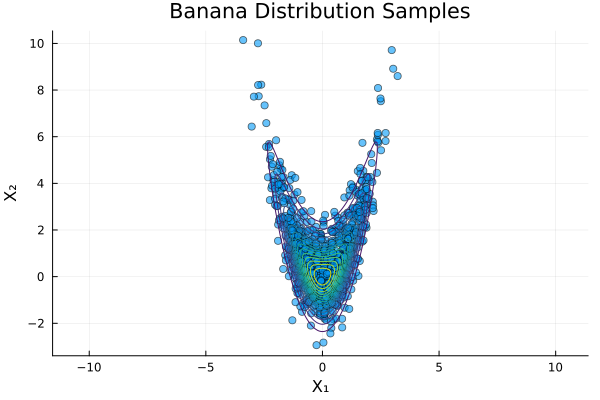
Check quality
var_diag_banana = variance_diagnostic(M_banana, target_density_banana, reference_samples)
println("Banana distribution variance diagnostic: ", var_diag_banana)
Banana distribution variance diagnostic: 0.001587563598470299This page was generated using Literate.jl.