Choosing a Map Parameterization
A crucial aspect of constructing transport maps is the choice of map parameterization. In addition to the choice of the univariate basis functions, the construction of the multi-index set that defines the multi-dimensional polynomial expansion for each component can significantly influence the performance of the map.
The
Here,
Further,
Here,
By selecting an appropriate multi-index set
In TransportMaps.jl, three types of map structures outlined in [1] are implemented. Further, we implement a hyperbolic truncation using the
- Total Order Map: Includes all terms up to a specified total degree
for dimensions. In order to maintain the triangular structure, the -th component of the map only depends on the first variables. Thus, the multivariate basis for the -th component is constructed from the first univariate bases. The multi-index set satisfies:
- No-Mixed Terms Map: Excludes mixed terms, retaining only pure terms for each variable. The multi-index set
satisfies:
- Diagonal Map: Includes only diagonal terms, where each variable is independent of the others. The multi-index set
for the -th component satisfies:
- Hyperbolic / q‑norm truncation: Includes multi‑indices whose quasi‑norm is bounded by
. For
For an better overview, the multi-index sets for each map type will be visualized later.
Constructing Maps with Different Parameterizations
We will now demonstrate how to construct and compare the three types of map parameterizations using TransportMaps.jl. We start by importing the necessary packages:
using TransportMaps
using Plots
using Distributions
Then we define the three types of (sparse) maps. We consider a two-dimensional map with polynomial degree
Total Order Map
M_to = PolynomialMap(2, 3, Normal(), Softplus(), HermiteBasis())
# alternative: PolynomialMap(2, 3, Normal(), Softplus(), HermiteBasis(), :total)
PolynomialMap:
Dimensions: 2
Total coefficients: 14
Reference density: Distributions.Normal{Float64}(μ=0.0, σ=1.0)
Maximum degree: 3
Basis: HermiteBasis
Rectifier: Softplus
Components:
Component 1: 4 basis functions
Component 2: 10 basis functions
Coefficients: min=0.0, max=0.0, mean=0.0No-mixed-terms Map
We can use the NoMixedMap constructor for this map type:
M_nm = NoMixedMap(2, 3, Normal(), Softplus(), HermiteBasis())
# alternative: PolynomialMap(2, 3, Normal(), Softplus(), HermiteBasis(), :no_mixed)
PolynomialMap:
Dimensions: 2
Total coefficients: 11
Reference density: Distributions.Normal{Float64}(μ=0.0, σ=1.0)
Maximum degree: 3
Basis: HermiteBasis
Rectifier: Softplus
Components:
Component 1: 4 basis functions
Component 2: 7 basis functions
Coefficients: min=0.0, max=0.0, mean=0.0Diagonal Map
For the diagonal map, we can use the DiagonalMap constructor:
M_d = DiagonalMap(2, 3, Normal(), Softplus(), HermiteBasis())
# alternative: PolynomialMap(2, 3, Normal(), Softplus(), HermiteBasis(), :diagonal)
PolynomialMap:
Dimensions: 2
Total coefficients: 8
Reference density: Distributions.Normal{Float64}(μ=0.0, σ=1.0)
Maximum degree: 3
Basis: HermiteBasis
Rectifier: Softplus
Components:
Component 1: 4 basis functions
Component 2: 4 basis functions
Coefficients: min=0.0, max=0.0, mean=0.0Hyperbolic Map
Finally, we also construct a map with hyperbolic truncation with
M_q = HyperbolicMap(2, 3, 0.7, Normal(), Softplus(), HermiteBasis())
# alternative: PolynomialMap(2, 3, Normal(), Softplus(), HermiteBasis(), :hyperbolic, 0.5)
PolynomialMap:
Dimensions: 2
Total coefficients: 12
Reference density: Distributions.Normal{Float64}(μ=0.0, σ=1.0)
Maximum degree: 3
Basis: HermiteBasis
Rectifier: Softplus
Components:
Component 1: 4 basis functions
Component 2: 8 basis functions
Coefficients: min=0.0, max=0.0, mean=0.0Visualizing Multi-Index Sets
The multi-index set determines the terms included in the polynomial expansion. We extract the multi-index sets of the second component of each map for visualization:
Extract the multi-index sets of the second component of each map for visualization:
ind_to = getmultiindexsets(M_to.components[2])
ind_nm = getmultiindexsets(M_nm.components[2])
ind_d = getmultiindexsets(M_d.components[2])
Finally, we plot the multi-index sets for each map type. This allows us to reproduce the comparison of multi-index sets as shown in Figure 1 in [1]:
scatter(ind_to[:, 1], ind_to[:, 2], ms=20, label="Total Order")
scatter!(ind_nm[:, 1], ind_nm[:, 2], ms=12, label="No Mixed")
scatter!(ind_d[:, 1], ind_d[:, 2], ms=6, label="Diagonal")
scatter!(xlim=(-0.5, 3.5), ylim=(-0.5, 3.5), aspect_ratio=1, legend=:topright,
    xlabel="Multi-index α₁", ylabel="Multi-index α₂",
    title="Multi-index Set of Map Component M²")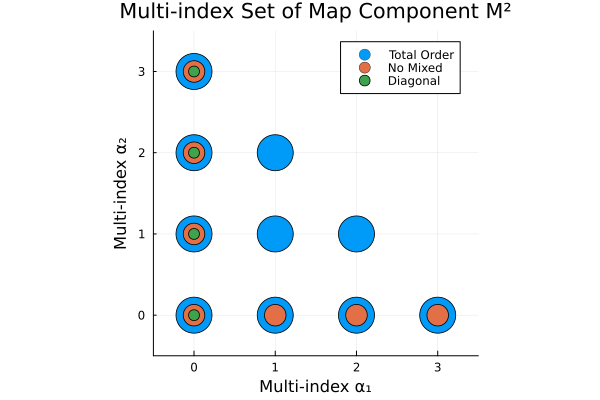
Visualize the Hyperbolic truncation
To show the effects of the truncation by 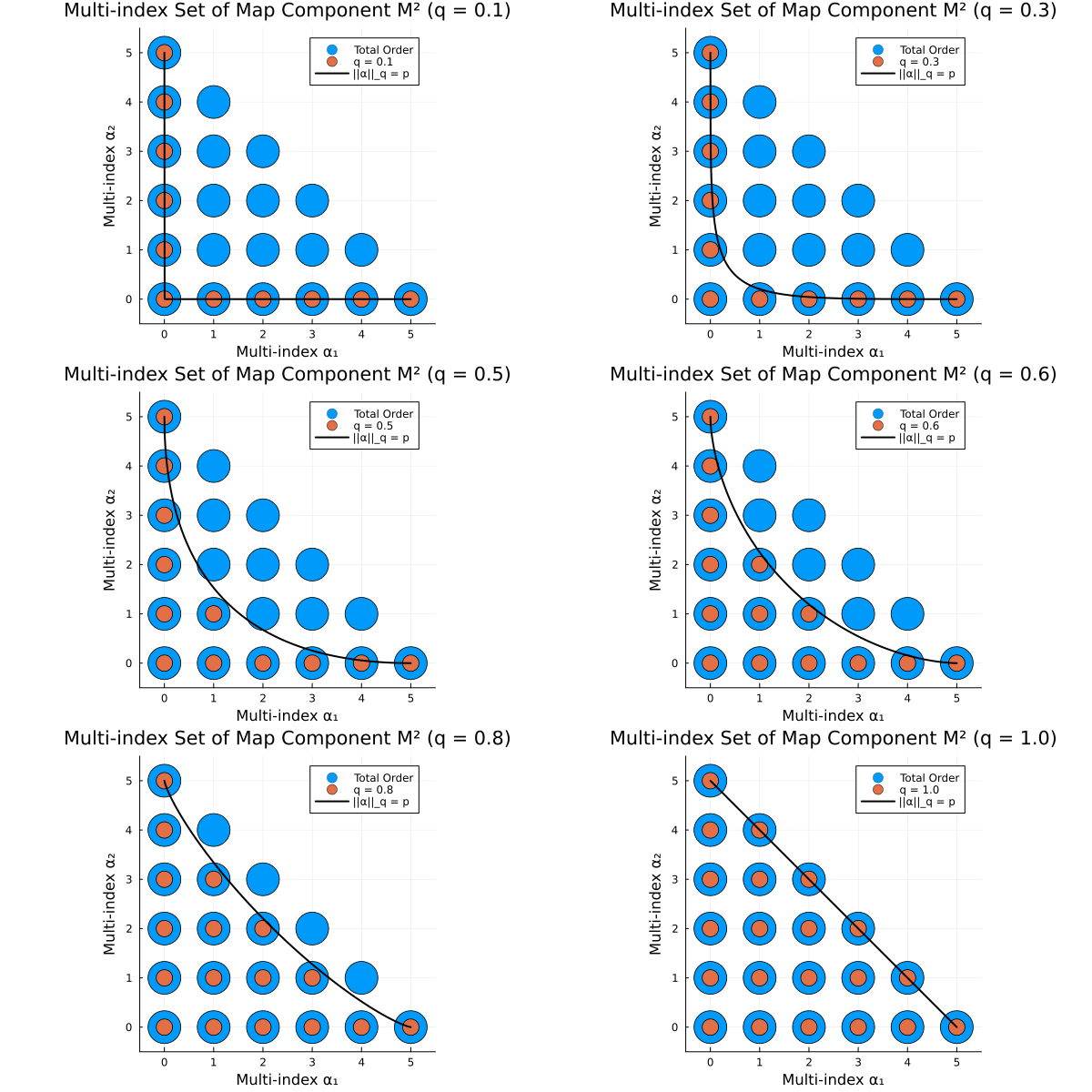
Example: Comparing Map Parameterizations
We optimize the coefficients of each map to match a cubic target density. The target density is defined as:
where
Define the cubic target density and visualize it:
cubic_density(x) = logpdf(Normal(), x[1]) + logpdf(Normal(), x[2] - x[1]^3 - x[1]^2)

x₁ = range(-3, 3, length=1000)
x₂ = range(-10, 20, length=1000)

true_density = [exp(cubic_density([x1, x2])) for x2 in x₂, x1 in x₁]
contour(x₁, x₂, true_density;
    label="x₁", ylabel="x₂", colormap=:viridis, levels=10)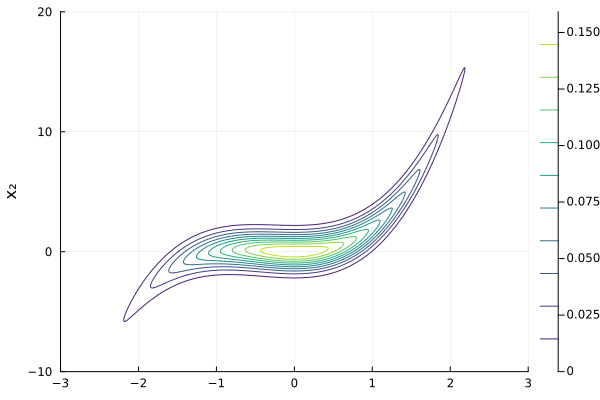
We create the MapTargetDensity and quadrature weights for optimization:
target = MapTargetDensity(cubic_density)
quadrature = SparseSmolyakWeights(3, 2)
Generate samples in the standard normal space
samples_z = randn(1000, 2)Now, we optimize each map type, compute the variance diagnostic and visualize the mapped samples.
Total Order Map
We start with the total order map:
optimize!(M_to, target, quadrature)

mapped_samples = evaluate(M_to, samples_z)
var_diag = variance_diagnostic(M_to, target, samples_z)
println("Variance Diagnostic: ", var_diag)

scatter(mapped_samples[:, 1], mapped_samples[:, 2],
    ms=4, label=nothing, c=1, title="Total Order",
    xlabel="x₁", ylabel="x₂")
Variance Diagnostic: 7.060744758297622e-16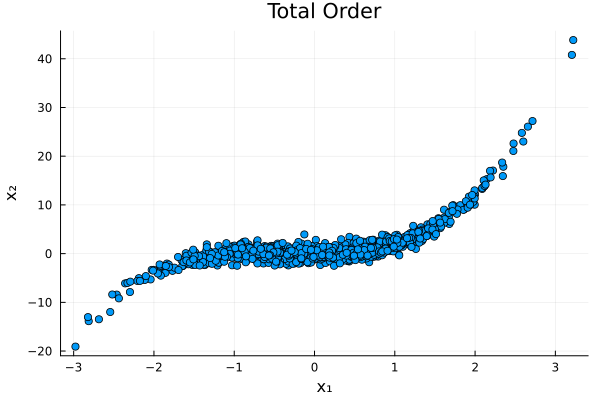
No Mixed Terms Map
Next, we optimize the no-mixed-terms map:
optimize!(M_nm, target, quadrature)

mapped_samples_no_mixed = evaluate(M_nm, samples_z)
var_diag_no_mixed = variance_diagnostic(M_nm, target, samples_z)
println("Variance Diagnostic: ", var_diag_no_mixed)

scatter(mapped_samples_no_mixed[:, 1], mapped_samples_no_mixed[:, 2],
    ms=4, label=nothing, c=2, title="No Mixed",
    xlabel="x₁", ylabel="x₂")
Variance Diagnostic: 8.703245735230789e-16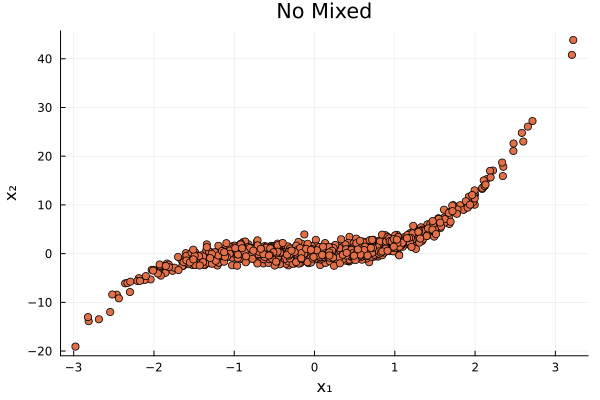
Diagonal Map
Finally, we optimize the diagonal map:
optimize!(M_d, target, quadrature)

mapped_samples_diagonal = evaluate(M_d, samples_z)
var_diag_diagonal = variance_diagnostic(M_d, target, samples_z)
println("Variance Diagnostic: ", var_diag_diagonal)

scatter(mapped_samples_diagonal[:, 1], mapped_samples_diagonal[:, 2],
    ms=4, label=nothing, c=3, title="Diagonal",
    xlabel="x₁", ylabel="x₂")
Variance Diagnostic: 0.0987280097599176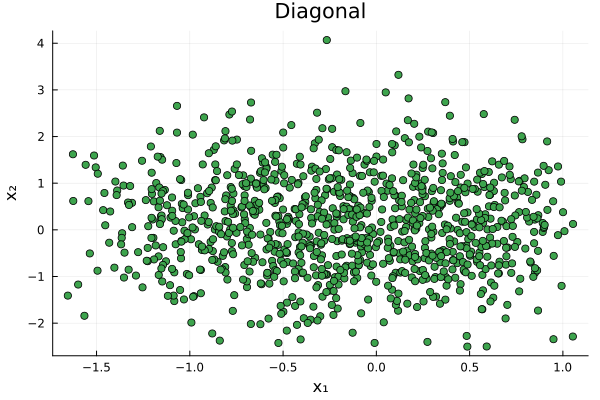
We observe that the total order and no-mixed-terms maps achieve similar variance diagnostics, while the diagonal map performs significantly worse due to its inability to capture dependencies between variables.
Adaptive Map Construction
The choice of map parameterization can significantly impact the performance of transport maps. In practice, one might start with a simpler map structure, such as the diagonal or no-mixed-terms map, and then adaptively enrich the map based on the observed performance, as discussed in [3]. This adaptive approach allows for a balance between computational efficiency and approximation accuracy. For more information see the Adaptive Transport Maps manual and [3].
This page was generated using Literate.jl.